For updates follow us:
Share this page:
Obba
A Java Object Handler for Excel, LibreOffice and OpenOffice.
Platform independent Spreadsheet Add-Ins with Client/Server Support .
Compatible with Excel/Windows, LibreOffice/Win/Mac/Linux, OpenOffice/Win/Mac/Linux, NeoOffice/Mac.
Version 6.2.2 (February, 2020)
Demo Movie: Creating objects dynamically from source code, see Class to Object Demo (movie).
About Obba
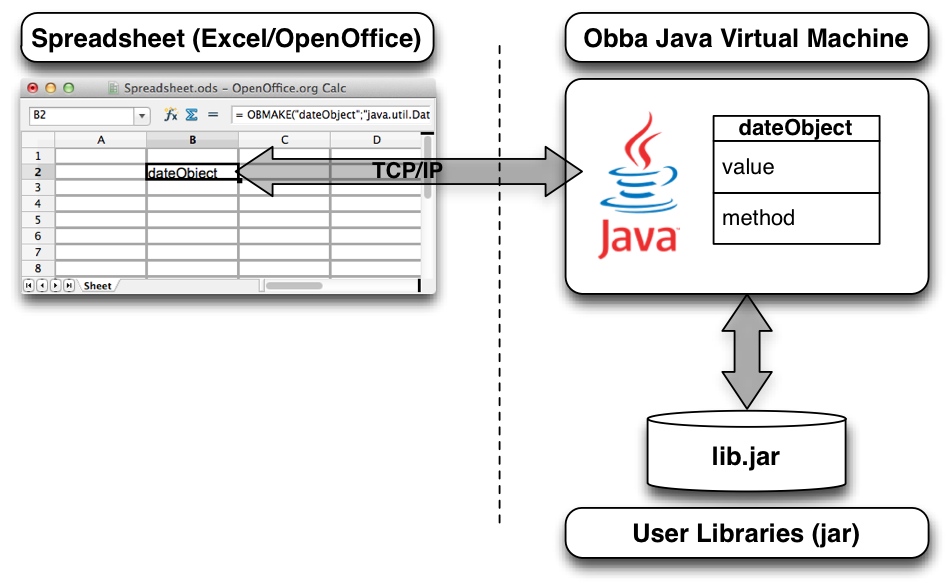
Schema of Obba Interaction: Obba provides access from the spreadsheet to objects created from classes of your library - without any additional coding. The spreadsheet and Obba JVM may run on different machines.
Obba provides a bridge between spreadsheets and Java classes. With Obba, you can use spreadsheets as GUIs (Graphical User Interfaces) for your Java libraries. Its main features are:
- Stateful access to almost all objects and methods running in a Java virtual machine via a fixed set of spread sheet functions.
- Client/server support: The Java virtual machine providing the add-in may run on the same computer or a remote computer - without any change to the spreadsheet.
- Loading of arbitrary jar or class files at runtime through a spreadsheet function.
- Instantiation of Java objects, storing the object reference under a given object label.
- Invocation of methods on objects referenced by their object handle, storing the handle to the result under a given object label.
- Asynchronous method invocation and tools for synchronization, turning your spreadsheet into a multi-threaded calculation tool.
- Allows arbitrary number of arguments for constructors or methods (avoids the limitation of the number of arguments for Excel worksheet functions).
- Serialization and de-serialization (save Serializable objects to a file, restore them any time later).
- All this through spreadsheet functions, without any additional line of code (no VBA needed, no additional Java code needed).
Use cases:
- For Spreadsheet Users: Creating powerful spreadsheet calculations using external libraries, running calculations in Java.
- For Java Developers: Testing, debugging and analyzing Java libraries with spreadsheets. Setting up unit test in spreadsheets. Using spreadsheets as GUI to your object while debugging.
Advanced Features:
- Obba allows to create an object from Java source code (dynamically compile source to java.lang.Class, re-load the class definition and instantiate an object from it), see Class to Object Demo (movie).
For tutorials see Obba tutorials.
For a more detailed introduction see Obba documentation.
Advantages
No Glue Code
Obba is different from interfaces such as XLL4J, XLW, ExcelDNA, etc. in that it requires no glue code to link the spreadsheet to the library. Objects are instantiated by their original constructor. A spreadsheet-specific factory method is not necessary.
Tracking Objects
Since objects are instantiated through the Obba functions and handled by Obba handles, Obba knows the object you are referencing in your spreadsheet. This allows tracking which objects are used as well as (implicitly) their dependencies.
Debugging Sheets
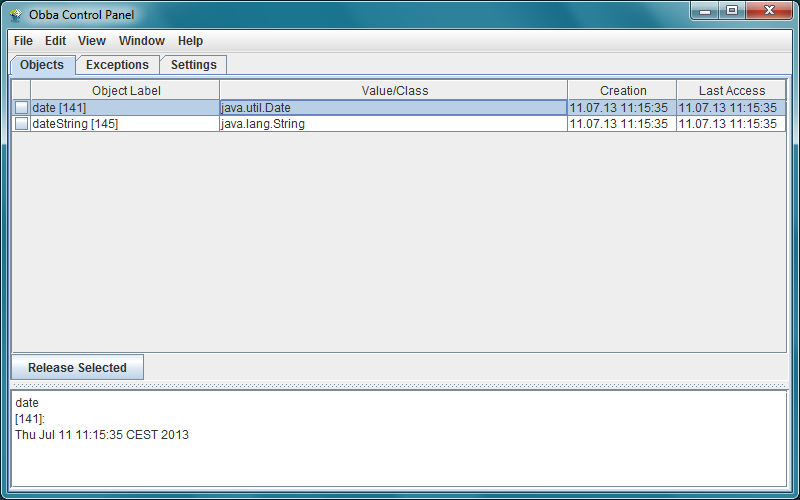
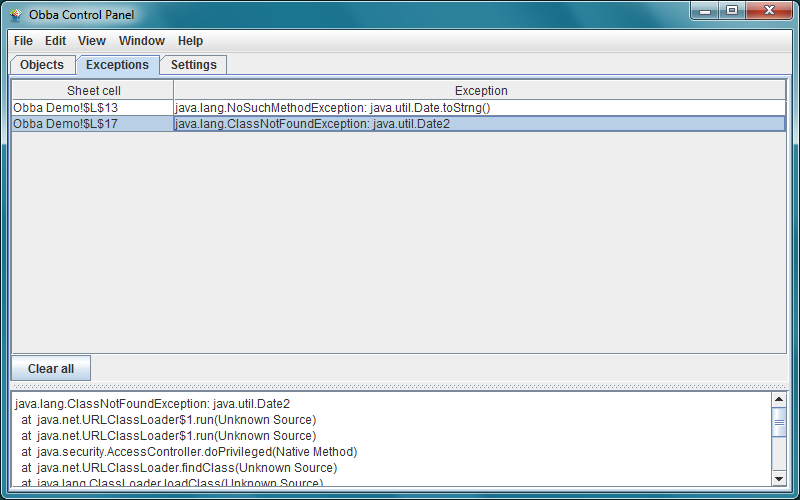
Obba for Excel tracks the calling spreadsheet cell. If the Java execution raises an exception, Obba lists the spreadsheet cell containing the function that raised the exception in the Obba Control Panel.
Platform Independent
The Obba spreadsheet functions are available in Excel (running on Windows), in OpenOffice and LibreOffice (running on Windows, Mac OS X, Linux, etc.) and in NeoOffice (running on Mac OS X). Hence, if your external library is platform independent, your spreadsheet is platform independent too (within the platforms supported by OpenOffice, assuming that your spreadsheet does not rely on technologies other than OpenOffice, Obba and your library).
Example: Creating an Object and Calling a Method on that Object
Spreadsheet functions…
Construction of java.util.Date object in spreadsheet cell A1 (for example):
Spreadsheet (cell A1) (Excel/OpenOffice)
= obMake("dateObject","java.util.Date")
Invocation of method toString (having no arguments), on the object created in cell A1, storing the result of the method under the object label dateString.
Spreadsheet (Excel/OpenOffice)
= obCall("dateString",A1,"toString")
|
…correspond to Java code.
This corresponds to the Java code
Java
import java.util.Date;
Date dateObject = new Date();
String dateString = dateObject.toString();
|
-
Object references correspond to spreadsheet cells.
-
Constructors are called via the obMake spreadsheet function (returns a string handle to the object reference).
-
Methods are called via the obCall spreadsheet function (returns a string handle to the object reference of the result).
Licensing
The unregistered version of Obba is available at no charge as long it is neither modified nor redistributed in a modified package. The unregistered version will present a spash screen and startup is slightly delayed.
We offer a regular license and a developer license on a per user basis.
If you acquired a regular license, we grant the use of Obba for commercial purposes, with no right to modify or redistribute Obba. You will receive a registration key to remove the Obba splash screen.
If you acquired a developer license, we grant you ("the Third Party Developer") the redistribution of Obba together with the Ice components (Ice.jar and Ice.dll) included in Obba with your own products, provided that you do not modify Obba (the class files within Obba.jar) and provided that you do not use the Ice components (Ice.jar and Ice.dll) and comply with the Ice license agreement included in Obba.zip. End users shall not be permitted to modify or distribute any part of your product(s) using Obba. You will receive a registration key to remove the Obba splash screen.
Obba is provided under the terms stated in the LICENSE.txt file, distributed in the Obba.zip file.
The following pricing applies to Version 3.x and 4.x:
Regular and Developer Licenses
|
Trial/shareware license
|
|
free
|
The unregistered version may be used for an unlimited time.
Note: The unregistered version starts with a splash screen, which will disappear within a few seconds.
The unregistered version may not be modified or redistributed in a modified from.
|
|
Regular license:
|

|
The regular license for commercial and/or corporate use is 29 Euro per user (technical users running Obba server), payable via PayPal.
|
|
Developer license:
|
|
|
The developer license for commercial and/or corporate use is 49 Euro per developer, payable via PayPal.
|
Note: Please retain your PayPal notification of payment as proof of purchase.
Download, Installation and System Requirements
Download
Obba is distributed as a ZIP archive - Obba.zip. Current version is 6.2.2 (February, 2020). (release notes)
Installation
To install Obba:
-
Download and unzip the Obba.zip archive.
-
To install Obba for Excel/Windows:
-
Open the folder "Obba for Excel for Windows"
-
Launch "Install Obba.exe".
-
To install Obba for OpenOffice:
-
Open the folder "Obba for OpenOffice"
-
Open "Obba.oxt".
- Notes
-
-
The installation of Obba requires Java to be enabled in OpenOffice/LibreOffice.
-
For OpenOffice on MacOS X: Due to a bug in Mac OS X / OpenOffice 4.1 the installation requires the presence of Java 6, but this is only required for the installation.
-
For LibreOffice on MacOS X: Due to a bug in LibreOffice 4.2, 5.1, 5.2 the installation will hang if Obba.oxt is opened via "Double Click". Instead, start LibreOffice, Open Extension Manager and select "Add" to add Obba.oxt manually.
Install complete! Now, try one of the demos in the Demos folder.
Note: To use the client / server feature you need to perform a small additional installation step, see
Note: If have Obba for OpenOffice 2.x installed you need to remove it first!
You cannot use the OpenOffice Updater to Update Obba 2.x to Obba 3.x.
System Requirements
When using Obba with Excel:
-
Java 1.8 Runtime or better (for Java 1.6 please use Obba 4.x: Obba 4.2.2 (legacy version)).
-
Microsoft Windows XP or better (tested with Windows XP, Windows 7 x86 and Windows 7 x64)).
-
Microsoft .NET Framework 4.0 (included in Windows Vista and Windows 7) (if this is missing, Microsoft offers an installer). The .Net 4.0 Client Profile is sufficient.
-
Microsoft Excel 2000 for Windows or better (tested with Excel 2000, Excel 2007, Excel 2010, Excel 2013 (x86 and x64).
Note: Obba 3.x is no longer compatible with Windows 2000 (due to the absence of a .Net 3.5 framework).
Obba 4.x is no longer compatible with Windows 2000 (due to the absence of a .Net 4.0 framework).
When using Obba with OpenOffice:
-
OpenOffice 3.x or OpenOffice 4.x or LibreOffice 4.1
-
with Java 1.8 Runtime or better (any platform). Note: You have to enable Java in OpenOffice/LibreOffice. (For Java 1.6 please use Obba 4.x: Obba 4.2.2 (legacy version).)
Also runs with NeoOffice.
First Steps, Documentation
First Steps
Once Obba is installed, it is available in Excel/OpenOffice after launching. For examples of how to use Obba take a look at the files in the Demos folder.
We recommend that you first try out the Date Demo, which uses java.lang.Date
to demonstrate object instantiation and method invocation. It also gives an example of transient object handles.
Next, try the Normal Distribution Demo. It loads an external jar (here Apache's commons-math.jar) and uses a class from it to
calculate the cumulative normal distribution. There are two versions of this Excel sheet: the one entitled "concurrent" invokes the
calculations concurrently.
When developing new sheets it is helpful to open the Obba log window. See Obba Control Panel: Windows. You may see the Obba log messages in the OS X Console application.
Documentation
Documentation is available online. You may also access the Obba documentation offline via the Obba control panel's "Help" menu.
Version History (selected)
For a detailed version history see the release notes.
Version 5.0 -> 6.0:
- Support for Java 9 and Java 10.
- Bug fixes.
- Convenient way to construct java.time.LocalDateTime from Excel date.
Version 4.x -> 5.0:
- Obba requires Java 8.
- Convenient way to construct java.time.LocalDate from Excel date.
Version 4.0 -> 4.1:
- Support for variadic arguments.
- Convenient way to create List objects.
- Improvements to the Java reflection engine.
Version 3.1 -> 4.0:
- Update of core components. Use of .Net Framework 4.0 in Obba for Excel.
- Improved exception handling.
Version 3.0 -> 3.1:
- Build-in utility classes to dynamically instantiate an object from a Java source code string from the spreadsheet.
- Improved configuration of client and server via property-files (ObbaClient.properties and Obba.properties).
Version 2.2 -> 3.0:
- Complete rewrite of the spreadsheet add in part for Excel and OpenOffice/LibreOffice.
- Obba server, i.e., the JVM, now running in separate process.
- Obba server may be launched with custom arguments.
- Client/Server support: Obba server process may run on different machine.
Version 2.1 -> 2.2:
- Added features for developers to allow bundling of Obba with your own sheets and JARs and/or white labeling. See the Obba developer page.
Version 1.9 -> 2.1:
- Complete rewrite of Obba logging giving you better diagnostic output.
- Log window accessible from the Obba Control Panel.
- New features like easier instantiation of Java arrays and access to Java arrays.
Version 1.8 -> 1.9:
- Visualization of the object (implicit) dependency graph. Visualizes object and the arguments used to create them.
- Better handling of transient object labels.
- Significant performance improvements.
Version 1.7 -> 1.8:
- Obba no longer needs administrator privileges. It is installed in a user-specific location (%APPDATA%\Obba).
- Significant performance improvements.
Developer Documentation
The developer documentation provides instructions on how to bundle Obba with your application (i.e., how to build your own installer). This includes automatic installation of a registration code.
Performance
Obba for OpenOffice handles 10000 spreadsheet function calls (e.g., object instantiation (obMake), method invocation (obCall), or result conversion (obGet)) in 4 seconds on a 2.5 GHz Intel i5. On a multi-core architecture control panel (with GUI updates) and logging do not affect the performance since they run in their own thread.
Obba for Excel is a bit slower overall.
The following table gives an overview.
| Time for 10000 Calls |
| OpenOffice 3.4: |
4 sec |
| Excel: |
9 sec |
Feedback and Feature Requests
Please send feedback and feature requests to info@obba.info.